Activity logs and reporting
NexaWP Manager provides comprehensive activity logging to help you track every action performed on your WordPress sites. From plugin updates to user management, every operation is recorded with detailed information for auditing, troubleshooting, and client reporting purposes.
Understanding activity logs
Every action performed through NexaWP Manager is automatically recorded in the activity log system. This includes synchronization events, plugin and theme updates, user management operations, core WordPress updates, and configuration changes.
Each log entry captures essential information: the action type, affected entity, timestamp, status (success, error, warning, or info), and detailed contextual data.
The logging system operates transparently in the background, requiring no configuration from you. Whether you’re updating a single plugin or performing bulk operations across multiple components, each action generates a corresponding log entry.
This comprehensive tracking ensures you always have a complete audit trail of your site management activities, which is invaluable for troubleshooting issues or demonstrating work performed to clients.
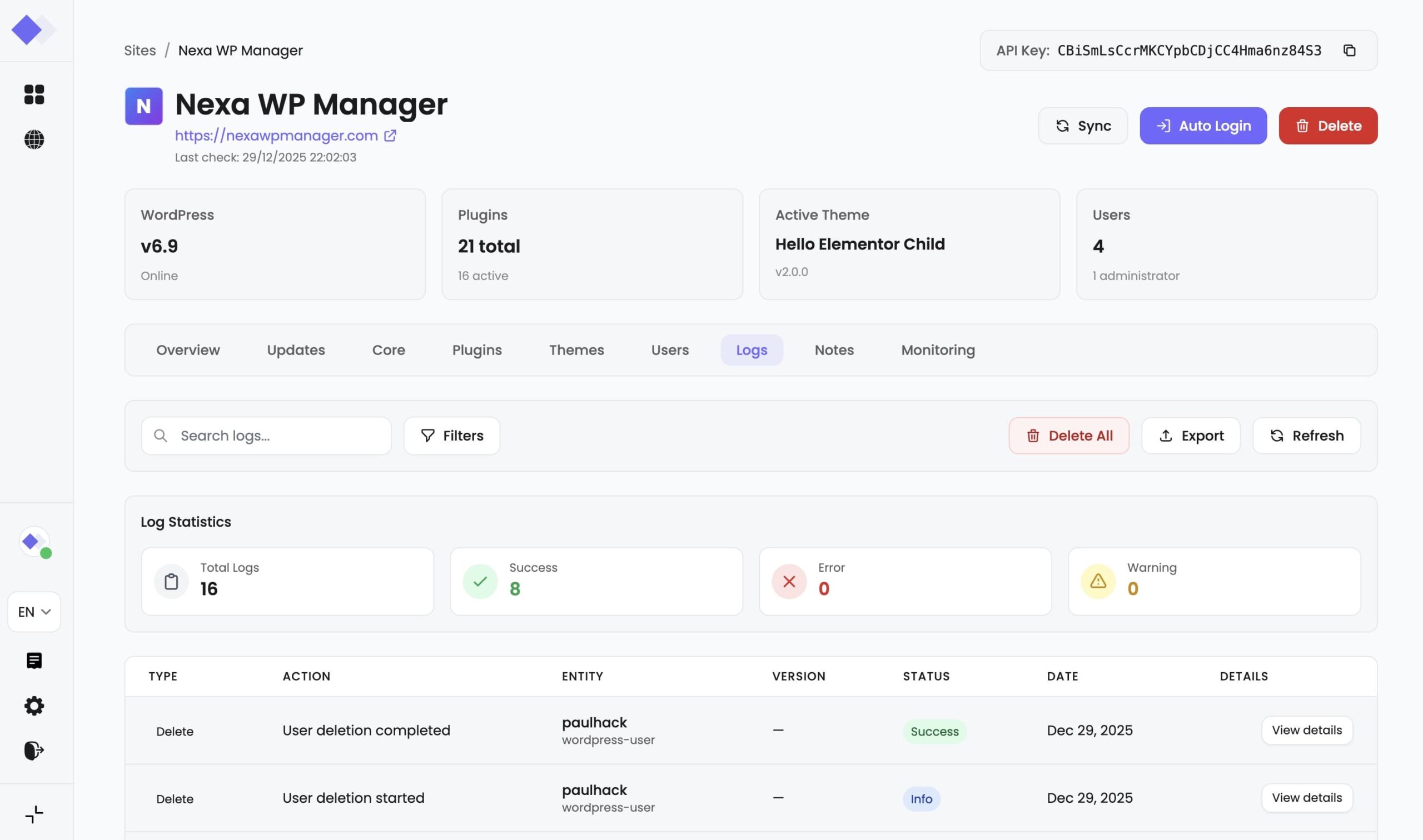
Filtering and searching logs
The activity log interface provides powerful filtering capabilities to help you find specific entries quickly. You can filter logs by action type (plugin, theme, core, user, or site operations), by status (success, error, warning, or info), and by entity type. The search functionality allows you to find logs containing specific keywords in entity names, slugs, or messages.
For time-based analysis, you can specify date ranges to view logs from specific periods.
This is particularly useful when investigating issues that occurred at a particular time or when generating reports for specific timeframes. All filters can be combined to narrow down results precisely, and the system remembers your filter preferences during your session.
Exporting log data
NexaWP Manager supports exporting your activity logs in two formats: CSV and JSON. CSV exports are ideal for opening in spreadsheet applications like Excel or Google Sheets, making it easy to analyze data, create charts, or share with team members who prefer tabular formats. JSON exports preserve the full data structure including nested details, making them suitable for technical analysis or integration with other systems.
When exporting, your current filter settings are applied, allowing you to export only the relevant subset of logs. You can also specify custom date ranges for the export, independent of your current view filters. This flexibility ensures you can generate exactly the report data you need, whether it’s a complete history or a focused snapshot of specific activities.
Log statistics and insights
The statistics panel provides an at-a-glance overview of your site’s activity. You can see the total number of logged events, broken down by status type. This helps you quickly identify if there are recurring errors or warnings that need attention. A high error count might indicate configuration issues, while a steady stream of successful operations confirms your site management is running smoothly.
The statistics automatically update as new logs are recorded and when you change your filter settings. This real-time feedback helps you understand patterns in your site management activities and can highlight areas that may need optimization or additional attention.
Reporting roadmap
We are continuously improving NexaWP Manager’s reporting capabilities. Here’s what’s coming in future updates:
PDF site health reports (coming soon)
Generate comprehensive PDF reports containing complete site health information. These professional reports will include WordPress core status, plugin and theme inventory with update status, user account summary, security recommendations, and performance metrics. Perfect for sharing with clients or stakeholders who need a complete overview without accessing the dashboard.
Planned features:
- Customizable report templates with your agency branding
- Scheduled automatic report generation (weekly, monthly)
- Email delivery to specified recipients
- Historical comparison showing changes since last report
- Executive summary with key metrics and recommendations
PDF site health reports (coming soon)
Invite your clients to a dedicated secure space where they can view their site’s health status and activity reports without accessing the full management dashboard. Clients will have read-only access to relevant information, maintaining security while providing transparency.
Planned features:
- Secure invitation system with email verification
- Customizable client view (choose what clients can see)
- White-label option to match your agency branding
- Client-specific activity feed showing work performed
- Direct communication channel for client requests
Advanced analytics dashboard (planned)
A dedicated analytics section providing deeper insights into your site management activities across all connected sites. Track trends over time, identify patterns, and make data-driven decisions about your WordPress maintenance strategy.
Planned features:
- Cross-site comparison charts
Update compliance tracking (how quickly updates are applied) - Error trend analysis with suggested resolutions
- Time-saved calculations for automated operations
- Custom dashboard widgets for key metrics
Allgemeine Fragen
By default, logs are retained indefinitely. You can manually delete all logs for a site at any time using the “Delete all logs” function. In a future update, we will add configurable retention policies to automatically remove logs older than a specified period.
Currently, all actions are attributed to your NexaWP Manager account. In a future update with team collaboration features, logs will include the specific team member who performed each action.
Ja! NexaWP Manager bietet einen einzigen All-Inclusive-Plan. Die Website-Überwachung ist für alle Abonnenten ohne zusätzliche Gebühren oder Funktionseinschränkungen enthalten. Sie erhalten vollen Zugriff auf alle Überwachungsfunktionen, einschließlich anpassbarer Intervalle, Warnungen, Benachrichtigungen und Optionen zur Datenspeicherung.
Filtering and export
New sites won’t have logs until actions are performed through NexaWP Manager. Try syncing your site or performing an operation like updating a plugin. Also verify that your filters aren’t excluding all results by clicking “Clear filters”.
CSV exports create a flat table format ideal for spreadsheets and simple analysis. JSON exports preserve the complete data structure including nested details, which is better for programmatic processing or when you need access to all metadata.
Currently, exports are performed on a per-site basis. Multi-site export functionality is planned for a future update along with the advanced analytics dashboard.
Statistics and reporting
Statistics are calculated in real-time based on your current filter settings. If you have filters applied, the statistics will reflect only the filtered subset of logs, not the total. Clear all filters to see overall statistics.
- Success: The operation completed without any issues
- Error: The operation failed and may require attention
- Warning: The operation completed but with potential issues to review
- Info: Informational log entry, typically for sync operations or status changes
Currently, exports are performed on a per-site basis. Multi-site export functionality is planned for a future update along with the advanced analytics dashboard.
Currently, you need to check the logs manually to see errors. Real-time error notifications via email or in-app alerts are planned for a future update alongside the monitoring improvements.
Upcoming features
PDF site health reports are in active development and are planned for release in Q2 2025. Subscribe to our newsletter or follow our changelog to be notified when this feature launches.
The client portal will be available on Professional and Agency plans. Specific pricing and feature tiers will be announced closer to the release date.
Absolutely! We welcome feature requests from our users. Use the feedback button in the dashboard or contact our support team with your suggestions. Many of our planned features originated from user feedback.
 English
  Français
  Deutsch